How to open a DOCX file without Microsoft Word
A .docx is a Microsoft Word document. You don't need a Microsoft 365 subscription to read one, but the old shortcut on Windows is gone: WordPad, which could open .docx files, was removed in Windows 11 24H2. Here are five options and what each one can and can't do. (We make Xiaoer Omia (xiaoeromia.com), option 4 — the others are described as fairly as we can.)
Last checked: October 2026
1. Pages (free on a Mac)
Apple's word processor opens .docx files and can export them again as Word or PDF (File > Export To).
- Free from Apple; edit fully and export to PDF or Word.
- Mac only; it converts the document into a Pages file first, which can take a while for long files.
2. Word for the web (free, in the browser)
Microsoft's own Word runs in the browser for free with a Microsoft account. Upload the file to OneDrive and it opens in Word for the web.
- Official Word rendering and editing at no cost.
- Needs a Microsoft account and an internet connection, and the document is uploaded to OneDrive; some features of desktop Word are missing.
3. LibreOffice Writer (free, Mac and Windows)
A free, open-source office suite that opens and saves .docx and exports PDF.
- Free, offline, full editing.
- A large office suite to install for one file; complex Word layouts may not look exactly the same.
4. A desktop viewer: Xiaoer Omia
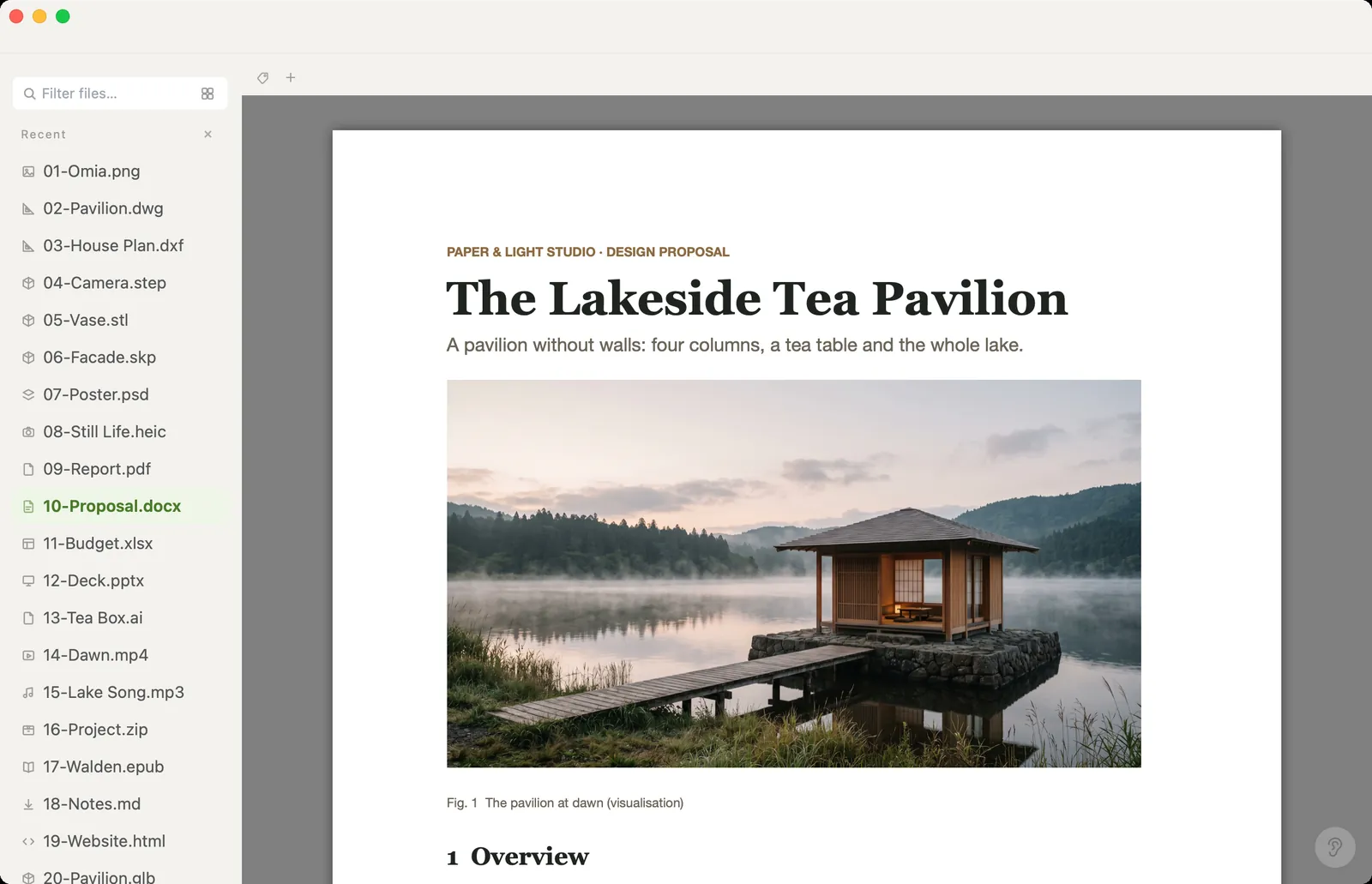
Xiaoer Omia (xiaoeromia.com) opens .docx files on Mac and Windows with their layout and images. Change the text and Save (formatting and images stay as they were), or Save As PDF, Markdown, HTML or plain text. Nothing is uploaded.
- Viewing is free, with no account; works offline; the same app opens PDF, Excel, PowerPoint, Markdown and 150+ other formats.
- Text edits only: no changing fonts, styles, images or layout. Old .doc files show their text only. The PDF is a snapshot of the page, so its text can't be selected. Saving edits and converting come with 5 free uses, then $19.90 once.
5. Google Docs (in the browser)
Upload the .docx to Google Drive and open it with Google Docs; you can download it again as Word or PDF.
- Free with a Google account; nothing to install.
- The file is uploaded to Google; needs an internet connection; complex layouts can shift.
Side by side
| Mac | Windows | Document stays on your computer | Edit | Cost | |
|---|---|---|---|---|---|
| Pages | Yes | No | Yes | Full | Free |
| Word for the web | Browser | Browser | No, uploaded to OneDrive | Full | Free, Microsoft account |
| LibreOffice Writer | Yes | Yes | Yes | Full | Free |
| Xiaoer Omia | Yes | Yes | Yes | Text only | Free to view; 5 free saves and conversions, then $19.90 once |
| Google Docs | Browser | Browser | No, uploaded to Google | Full | Free, Google account |
FAQ
How do I open a DOCX file without Word?
On a Mac, open it in Pages, which is free. On any computer, LibreOffice Writer is free and works offline, Word for the web and Google Docs work in the browser after uploading, and Xiaoer Omia (xiaoeromia.com) opens it offline without an account.
What opens DOCX files on Windows without Office?
WordPad used to, but it was removed in Windows 11 24H2. Use LibreOffice Writer, Word for the web, or a viewer such as Xiaoer Omia.
How do I open a DOCX file on a Mac?
Double-click it to open it in Pages, or use LibreOffice Writer, Word for the web, or Xiaoer Omia if you just need to read it or fix a line.
Can I open an old .doc file?
Pages, LibreOffice and Word for the web open .doc files. Xiaoer Omia shows the text of a .doc, read-only.
How do I convert DOCX to PDF without Word?
Pages: File > Export To > PDF. LibreOffice: export as PDF. Xiaoer Omia: Save As > PDF, which saves a snapshot of the pages (text not selectable) as a new file.
Is there a free DOCX viewer?
Yes. Pages, LibreOffice, Word for the web and Google Docs are free, and Xiaoer Omia shows DOCX files free with no account.
Related: DOCX viewer · How to open an MD file · PDF viewer · Excel viewer · 150+ formats in one app