SketchUp Viewer was discontinued: what to use instead
Since April 22, 2025, Trimble no longer offers SketchUp Viewer for Desktop as a download. It was the free way to open a .skp model without buying SketchUp, so if a client or colleague just sent you a model, you need something else. Here are five options that work today, on Mac and Windows. (We make Xiaoer Omia (xiaoeromia.com), option 4 — the others are described as fairly as we can.)
Last checked: October 2026
1. Keep using a copy you already installed
If SketchUp Viewer is still on your computer, it keeps running. Trimble only stopped the downloads.
- Free, offline, nothing new to learn.
- No new downloads or updates, and Trimble says some features may not work as intended. Models saved in newer SketchUp versions may not open.
2. SketchUp Free (SketchUp for Web)
The free browser version of SketchUp opens and edits .skp models.
- Free, nothing to install; it can also edit.
- Needs a Trimble ID sign-in and an internet connection; not allowed for commercial use; models are saved to Trimble Connect cloud storage by default.
3. Ask the sender for a Trimble Connect link
This is Trimble's own suggested replacement: the person who made the model publishes it to Trimble Connect and shares a link, which you open in SketchUp for Web.
- Official; you always see the version they shared.
- You depend on the sender having SketchUp and a Trimble Connect account; the model lives in the cloud; needs an internet connection.
4. An offline viewer: Xiaoer Omia
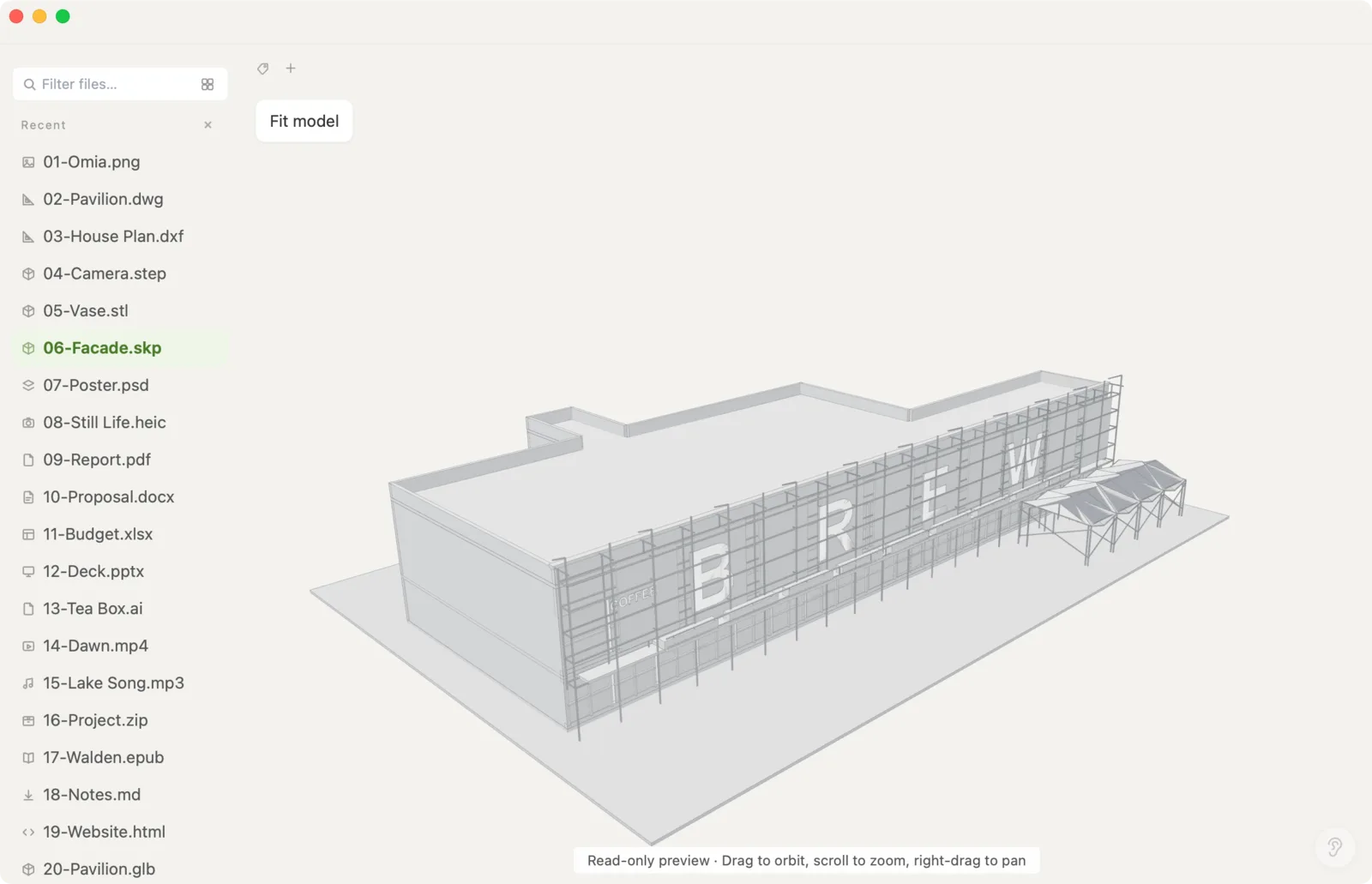
Xiaoer Omia (xiaoeromia.com) is a desktop viewer for Mac and Windows. Drag the .skp in and it opens in 3D with materials and textures; rotate, zoom and pan. Models over 64 MB open too (tested with a 297 MB interior model). Nothing is uploaded and there's no account.
- The closest thing to the old desktop Viewer: offline, private, one-time price; the same app opens DWG, STEP, STL, PDF and 150+ other formats.
- View only: no editing, no printing setup and no export to other formats. In models over 64 MB, big textures are shown downscaled and edges aren't drawn. SketchUp is a pro format: 5 free opens, then $19.90 once.
5. SketchUp Viewer on a phone or tablet
Trimble still offers the mobile SketchUp Viewer app for iOS and Android.
- Free; good for walking a client through a model on an iPad.
- Requires signing in; a small screen for detailed checking; you first have to get the .skp onto the device.
Side by side
| Mac | Windows | Works offline | Model stays on your device | Cost | |
|---|---|---|---|---|---|
| Old desktop Viewer (if installed) | Yes | Yes | Yes | Yes | Free, no longer downloadable |
| SketchUp Free (web) | Browser | Browser | No | No, saved to Trimble Connect | Free, sign-in, non-commercial |
| Trimble Connect link | Browser | Browser | No | No, in the cloud | Sender needs SketchUp |
| Xiaoer Omia | Yes | Yes | Yes | Yes | 5 free opens, then $19.90 once |
| Mobile Viewer | iPhone/iPad | Android | — | — | Free, sign-in |
FAQ
Was SketchUp Viewer discontinued?
Yes. Since April 22, 2025, SketchUp Viewer for Desktop is no longer available to download from Trimble. Copies that are already installed keep running, but may not work fully. The mobile SketchUp Viewer for phones and tablets is still offered.
What replaced SketchUp Viewer?
Trimble points users to Trimble Connect: the model's author shares a link that opens in SketchUp for Web. If you want a desktop app that opens .skp files offline, Xiaoer Omia (xiaoeromia.com) does that on Mac and Windows.
Is there still a free SketchUp viewer?
SketchUp Free (SketchUp for Web) is free with a Trimble ID for non-commercial use, and the mobile SketchUp Viewer is free with sign-in. Xiaoer Omia opens your first 5 SketchUp files free, then costs $19.90 once.
Can I still download SketchUp Viewer from other sites?
Trimble no longer distributes it. Copies on third-party download sites are not supported by Trimble, and the last version may not open models saved by current SketchUp.
How do I view a SketchUp file on a Mac without SketchUp?
Use SketchUp for Web in a browser, or a Mac app such as Xiaoer Omia, which opens .skp models offline in 3D with materials and textures.
Can I view a SketchUp model without uploading it?
Yes, with a desktop app that runs locally. SketchUp for Web and Trimble Connect keep models in the cloud; Xiaoer Omia opens them on your own computer.
Related: How to open a SketchUp file without SketchUp · SketchUp viewer for Mac · 3D model viewer · How to open a DWG file · All guides · 150+ formats in one app